
Yes, you can use a portable power station as a UPS, but only if it has a UPS or EPS mode, pass-through charging and a switchover of about 10 ms. A model without that mode can drop power for a moment during an outage, and that is enough to reboot a desktop PC or NAS.
What a power station needs to work as a UPS
A UPS sits between the wall and your equipment. When the wall power fails, it switches to battery fast enough that your device never notices. A power station can do this only if it is built to. Check for these four things:
- A UPS or EPS mode. This keeps the station powering your devices from the wall while it charges, then moves to battery when the wall power drops. Some stations only offer plain pass-through charging.
- A fast, stated switchover. Look for a number on the spec sheet. About 10 ms is the common claim for UPS-capable stations.
- Pure sine wave AC output. Most power stations have it, but some cheap UPS units use a simulated wave, so confirm it on the label.
- Enough continuous watts. Your total load must stay under the station’s rated continuous output, not its surge rating.
Pass-through charging is not the same as a UPS. Some stations can charge and power devices at once but take far longer to transfer when the wall power fails. That gap can glitch a computer. If the manual does not say UPS or EPS and give a switchover time, assume it is not a UPS.
If you are shopping for this feature, our roundup of portable power stations with UPS function is the place to start.
UPS vs power station: switchover time explained
UPS designs differ in how they handle the handoff. A standby UPS passes wall power through and switches to battery when it fails, typically in about 4 to 10 ms. A line-interactive UPS adds voltage correction but also switches. An online UPS runs your load from its inverter all the time, so transfer is 0 ms.
Most PC power supplies can ride through a short gap, but longer ones cause a reboot. How long they tolerate depends on the power supply and the load, so treat the figures below as a guide.
| Device | Switchover | Source type |
|---|---|---|
| Online UPS | 0 ms | Design of the technology |
| Eaton 5PX G2 (UPS) | about 8.6 ms | StorageReview measurement |
| Bluetti AC60 | about 13.8 ms | StorageReview measurement |
| Bluetti AC70 | about 14 ms | StorageReview measurement |
| Anker SOLIX C2000 Gen 2 and S2000 | 10 ms | Manufacturer claim |
| EcoFlow RIVER 3 UPS | under 10 ms | Manufacturer claim |
Independent measurements and maker claims are different things. Even the two measured Bluetti units landed a few milliseconds slower than the typical 10 ms standby UPS figure, though they still sit in the range many desktop power supplies handle. Stations in non-UPS pass-through mode can take far longer, with some sources quoting tens to hundreds of milliseconds. Model and firmware matter, so confirm the figure for the exact unit you buy.
Which devices suit a portable power station as a UPS
The best fits are low-draw devices where a brief glitch is harmless or the power supply tolerates it.
Good fits
- Router and modem: about 10 to 25 W combined. This is the easiest and most useful use.
- Laptops and monitors: a laptop already has its own battery, so it is mostly safe.
- Security cameras, hubs and small smart-home gear.
- CPAP: many users run one from a power station, but see the safety note below.
Use caution
- Desktop PCs: fine if the station’s switchover is around 10 ms and you accept the risk of an occasional reboot.
- NAS: a sudden drop can corrupt a volume mid-write. Most stations also cannot signal a NAS or PC to shut down cleanly, which a UPS with USB or network software can do.
Poor fits
- Servers and business-critical systems. Use a real UPS.
- Anything that must never lose power, including life-support or medical equipment, unless the manufacturer states the station is suitable for it.
How long will a power station run as a UPS?
Use this estimate: runtime (hours) = battery Wh × 0.85 ÷ load in watts. The 0.85 allows for inverter losses. Real results vary with the model, temperature and the inverter’s own idle draw, so treat it as a planning figure, not a guarantee.
| Load | 500 Wh station | 1,000 Wh station |
|---|---|---|
| 25 W (router + modem) | about 17 hours | about 34 hours |
| 50 W | about 8.5 hours | about 17 hours |
| 100 W | about 4 hours 15 minutes | about 8.5 hours |
| 200 W | about 2 hours 5 minutes | about 4 hours 15 minutes |
Worked example: router, modem and small NAS
- Router 12 W + modem 10 W + NAS 30 W = 52 W (typical figures; measure yours with a plug-in watt meter).
- A 500 Wh station: 500 × 0.85 = 425 Wh usable.
- 425 ÷ 52 = about 8 hours.
- A 1,000 Wh station gives 850 ÷ 52 = about 16 hours.
For a desktop PC that draws 150 W, a 1,000 Wh station gives 850 ÷ 150 = about 5 hours 40 minutes. Add the monitor’s draw if it is plugged in too. If you want enough capacity for longer outages, see our guide to portable power stations for home backup.
Can you leave a power station plugged in all the time?
Only if the manual allows it. Some makers advise against continuous pass-through use or say it can affect the warranty, so read that section first.
A UPS role keeps the station at or near full charge and warm from constant charging and inverter use. That is more wear than occasional camping use. To reduce it:
- Look for a charge-limit setting that holds the battery below 100%, if your model offers it. The trade-off is less runtime.
- Keep it ventilated and away from heat sources. Do not cover it while it charges and powers loads at once.
- Prefer LiFePO4 over NMC for a unit that stays plugged in. LiFePO4 packs are typically rated for more charge cycles than NMC, though the exact rating depends on the model.
Our list of lithium portable power stations shows which chemistry each unit uses. Test the UPS function every few months by unplugging the station from the wall and confirming your gear stays on.
When to buy a dedicated UPS instead
Decision rule: if losing power for even an instant could corrupt data or cost you money, buy a UPS. If a brief reboot is only an annoyance and you want hours of runtime, a UPS-capable power station is the better value.
A dedicated UPS wins when you need:
- Online (0 ms) or line-interactive protection for a server or NAS.
- Automatic, clean shutdown through USB or network management software.
- A battery designed to sit on float charge for years.
A power station wins when you need longer runtime, portable use for camping or a storm, or output for other things at the same time.
Spec-sheet checklist before you buy
- Does it say UPS or EPS mode, not just pass-through?
- Is the switchover time stated, and is it about 10 ms or less?
- Is the output pure sine wave?
- Is your total load under the continuous watt rating?
- Does the manual allow continuous plugged-in use?
Safety: do not rely on a power station for life-support or medical equipment unless the manufacturer says it is suitable. Never connect it to house wiring or a backfeed outlet; whole-house connections need a transfer switch installed under local electrical code. Use the original or approved cables and a grounded outlet.
Our Top Picks
Ready to shop? These are the top-rated options from our hands-on roundup, Best Portable Power Stations Ups of 2026.

HOWEASY 300W 222Wh Portable Power Station Solar Generator with 110V Pure Sine Wave, 65W USB-C for Camping, CPAP, Emergencies

ZeroKor 300W Portable Solar Generator with 60W Foldable Panel - 280Wh Power Station for Camping RV Outdoor Orange
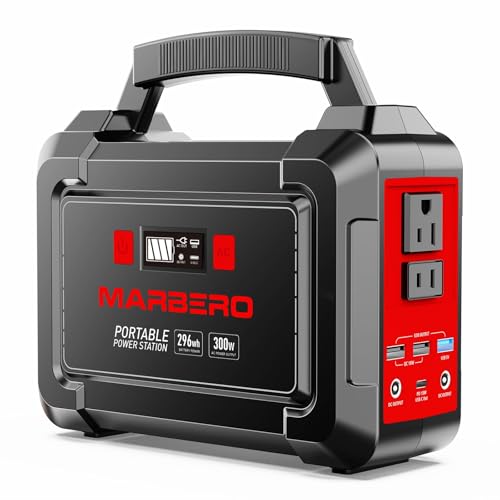
MARBERO 350W Portable Power Station, 296Wh Solar Generator with AC Outlet, QC3.0 USB-C, and LED Flashlight for Camping and Emergencies
As an Amazon Associate we earn from qualifying purchases. Product prices and availability are accurate as of the date/time indicated.
Frequently Asked Questions
Is pass-through charging the same as a UPS?
No. Pass-through charging means the station can charge and power devices at once. A UPS or EPS mode adds a fast, stated switchover when the wall power fails. Some pass-through stations take far longer to transfer, which can reboot a computer.
Will a power station keep my desktop PC from rebooting?
It can if the switchover is around 10 ms and the PC’s power supply tolerates the gap. This varies by model, so confirm the stated switchover. A PC with unsaved work or critical data is safer behind a dedicated UPS.
Can a power station shut my PC or NAS down safely?
Usually not. Most power stations have no USB or network link to tell a PC or NAS to shut down. A UPS with management software does this. Without it, your device runs until the battery empties or you shut it down yourself.
Can I put a UPS-mode power station on a surge protector?
Plug devices into a grounded outlet or a surge-protected strip rated below the station’s continuous watts. Check the manual first, because some makers advise plugging loads directly into the station’s outlets.
{“@context”: “https://schema.org”, “@type”: “FAQPage”, “mainEntity”: [{“@type”: “Question”, “name”: “Is pass-through charging the same as a UPS?”, “acceptedAnswer”: {“@type”: “Answer”, “text”: “No. Pass-through charging means the station can charge and power devices at once. A UPS or EPS mode adds a fast, stated switchover when the wall power fails. Some pass-through stations take far longer to transfer, which can reboot a computer.”}}, {“@type”: “Question”, “name”: “Will a power station keep my desktop PC from rebooting?”, “acceptedAnswer”: {“@type”: “Answer”, “text”: “It can if the switchover is around 10 ms and the PC’s power supply tolerates the gap. This varies by model, so confirm the stated switchover. A PC with unsaved work or critical data is safer behind a dedicated UPS.”}}, {“@type”: “Question”, “name”: “Can a power station shut my PC or NAS down safely?”, “acceptedAnswer”: {“@type”: “Answer”, “text”: “Usually not. Most power stations have no USB or network link to tell a PC or NAS to shut down. A UPS with management software does this. Without it, your device runs until the battery empties or you shut it down yourself.”}}, {“@type”: “Question”, “name”: “Can I put a UPS-mode power station on a surge protector?”, “acceptedAnswer”: {“@type”: “Answer”, “text”: “Plug devices into a grounded outlet or a surge-protected strip rated below the station’s continuous watts. Check the manual first, because some makers advise plugging loads directly into the station’s outlets.”}}]}